
Open source
Singapore MCP: official Singapore data, inside your AI assistant
Ask Claude or Codex about Singapore property, MRT and buses, companies, weather, the economy, public services and official financial reference data - and get answers that still carry the agency, dataset and observation period they came from. Singapore MCP is our open-source bridge to data.gov.sg, OneMap, LTA DataMall and SingStat: 291 read-only tools, MIT-licensed, free, and mostly keyless. It is the Singapore studio's contribution to the local AI community.
Try it right now, without installing anything
Message @OlanoSGBot on Telegram and ask a Singapore question in plain English. It is free to use and needs no API key. The same tools answer on the Olano AI WhatsApp business account, +65 8905 1632 - tap through and the question is already typed for you.
Chat on Telegram →
@OlanoSGBot. Press Start and ask a question - no signup, no API key, no Node.js. Send /forget at any time and the bot deletes the memory and conversation data it holds for you.
Chat on WhatsApp →
Olano AI Business, +65 8905 1632. Opens in your own WhatsApp with a first question ready to send - the Singapore agent answers with the same tools and the same sourcing.
Questions that work well in a chat window: "What is the two-hour forecast and the latest PSI?" · "What is the latest Category B COE premium?" · "Show recent 4-room HDB resale prices in Bedok." · "Which MRT stations are nearest to 1 Fullerton Road?" · "When is the next bus at stop 01012?"
Both bots are hosted by Olano, on a server in Singapore. Each person's conversation and memory is stored separately and scoped to their account on the messaging platform, so no user - and no agent session - can reach another user's data. Composing a reply sends the relevant message content to a third-party language-model provider, which may process it outside Singapore, so treat them as public chat and read the project's privacy notes before sending anything sensitive. Installing the server in your own AI client is the other route: it runs on your machine and sends nothing to Olano.
The problem it solves
Singapore publishes an unusual amount of high-quality public data. HDB resale transactions, ACRA company records, COE bidding results, MRT station and exit lists, live bus arrivals, PSI and rainfall readings, GDP and CPI series, MAS exchange rates, IRAS collections, visitor arrivals - almost all of it open, documented, and free.
Getting an AI assistant to use it properly is the hard part. Ask a general-purpose model about Toa Payoh resale prices and you get a plausible paragraph assembled from whatever it absorbed in training, with no dataset behind it and no date on it. The honest version of that answer requires finding the right dataset, filtering it to the right town, flat type and month, doing the arithmetic, and then saying out loud which agency published it and when.
Singapore MCP does exactly that, as a Model Context Protocol server: a small program your AI app runs, which gives it a set of tools it can call. You install it once and then ask questions in plain English.
Every answer shows its work
This is the design rule the whole project is built around. Wherever the upstream format allows it, a result keeps its source agency, dataset or table identifier, source URL, retrieval time, observation period, units, and freshness caveats. A stale or frozen series says so. A number whose units differ from the series next to it is not quietly averaged with it. A company-name match that could be ambiguous is reported as ambiguous.
That is what makes the output checkable rather than merely fluent - and it is the same instinct behind everything else we build: an answer a human can audit is worth more than an answer that merely sounds right.
What is in the box
- 291 read-only tools across property, rail, buses and roads, companies, weather and environment, education, the economy, and official financial reference data.
- Eight Agent Skills - packaged workflows that teach a client when to reach for which tool, for property, mobility, economy, business, civic and finance research, plus one for developing against the server itself.
- Seven Claude Code plugins: the complete suite, plus six focused profiles (
property,mobility,business,economy,civic,finance) for sending fewer tool definitions to the model. - Twelve packages: install the aggregate server for everything, or a focused executable when you only need one provider - data.gov.sg, OneMap, LTA, weather, or rail.
- Both transports: stdio for local clients, Streamable HTTP for the ones that prefer it. Plus a command-line tool for calling the same tools from a terminal.
Upstream sources are data.gov.sg (including the ACRA, HDB, URA, MOE, ECDA, IRAS, STB, EMA, SPF, MOH and NEA datasets in the curated catalog), OneMap from the Singapore Land Authority, LTA DataMall, and the SingStat Table Builder.
What it looks like in a chat
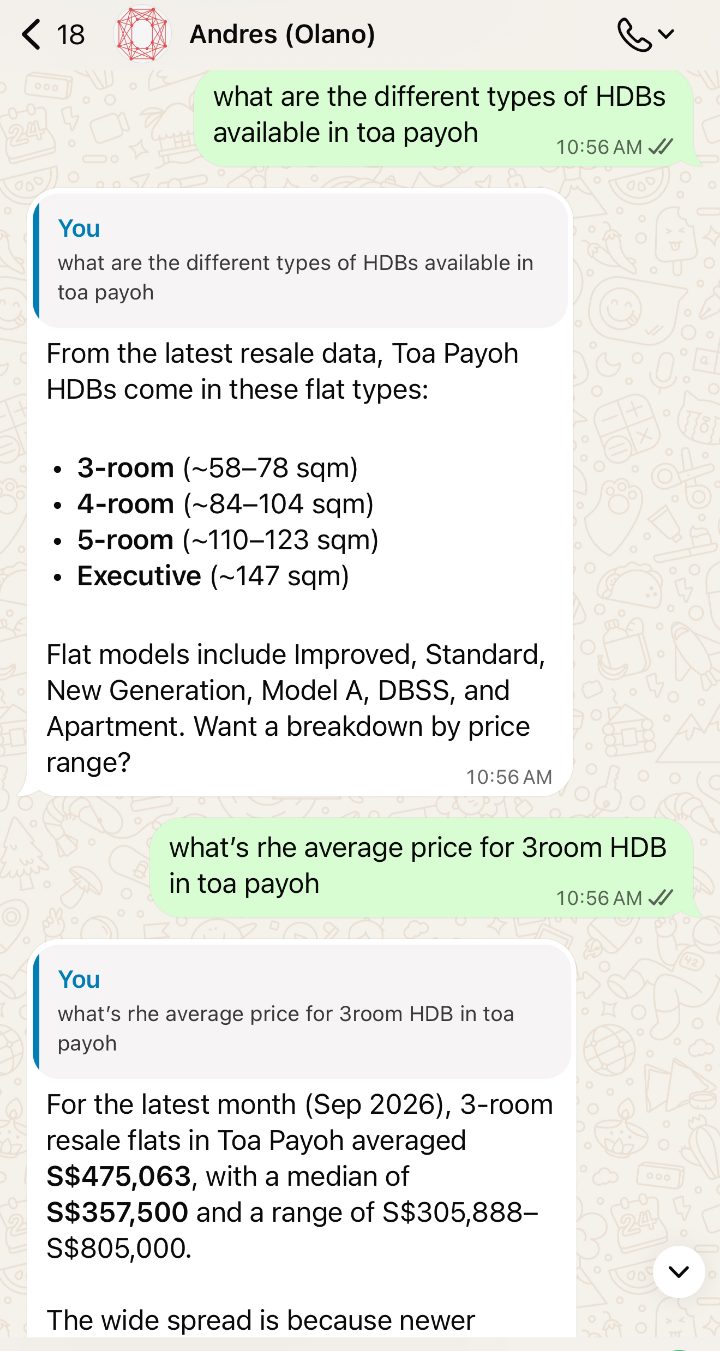
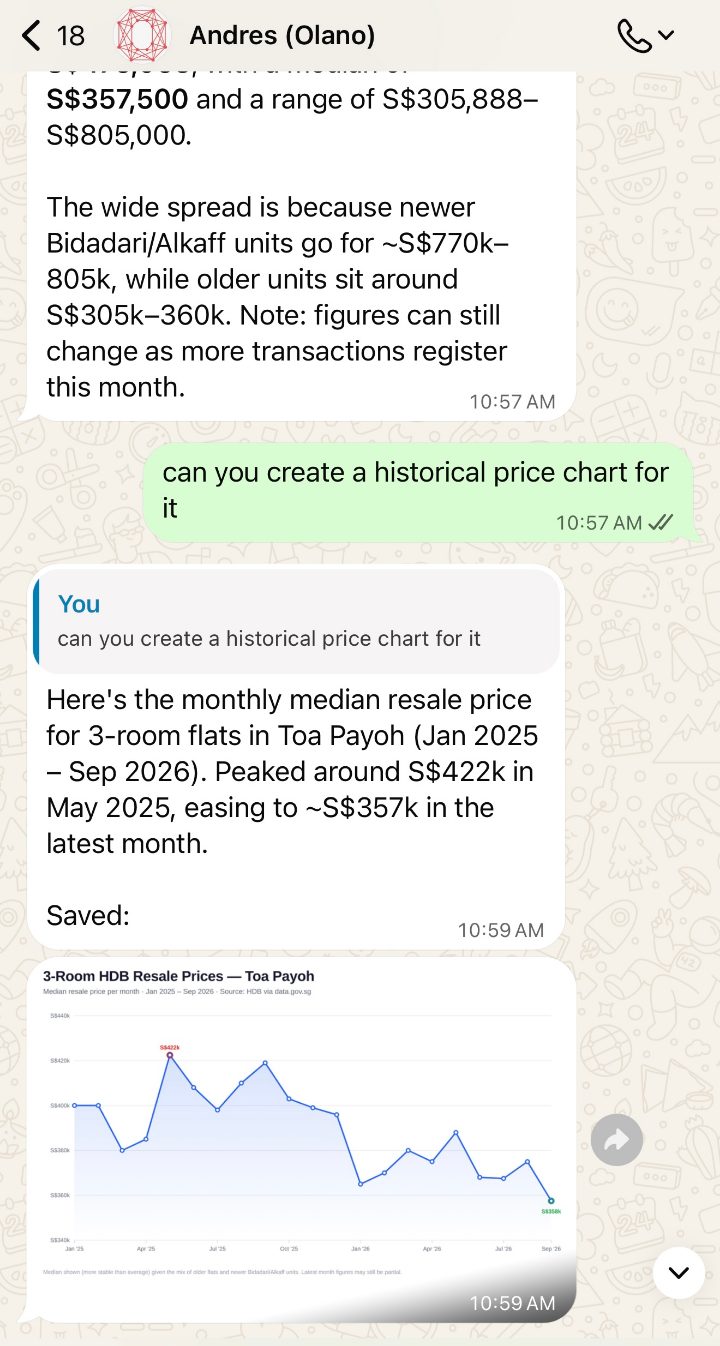
These two screenshots are real exchanges with the Olano WhatsApp agent, which answers Singapore questions with these tools. Note what the second reply does with a badly-behaved distribution: it gives the average, then the median, then the range, then explains the gap between them - newer Bidadari and Alkaff units against older stock - and flags that the current month is still filling up. The follow-up asks for a chart, and the agent builds one and sends it back into the chat.
Plain English in, sourced answers out
The flat types a town actually has, then the average, median and range for a 3-room - from the latest HDB resale records.
"Can you create a historical price chart?"
It plots the monthly median from January 2025, marks the peak and the latest month, and sends the chart straight back.
Install it in your own AI client
Running it yourself is the everyday route: the server runs locally, has no Olano account, and sends no telemetry. You need Node.js 20 or newer for every route except the Claude Desktop extension, which carries its own runtime.
Claude Code
Use the plugin - it installs the MCP server and all eight Agent Skills, so answers come back better sourced. Two commands at the Claude Code prompt:
/plugin marketplace add olano-ai/mcp-singapore/plugin install olano-singapore@olano
Choose User scope so it works in every project, then run /mcp to confirm singapore is connected. The first call takes 20-30 seconds while the package downloads; after that it is fast.
Claude Desktop app
Download olano-singapore.mcpb from the project's latest release and double-click it. Claude Desktop shows a review dialog; select Install, leave every optional key blank, and ask a question. No terminal, no restart.
Codex app and Codex CLI
They share one configuration. From the CLI: codex mcp add singapore -- npx -y @olano/mcp-singapore. In the app: Settings → MCP servers → Add server, name it singapore, choose STDIO, command npx, arguments -y @olano/mcp-singapore.
Anything else that speaks MCP
Point any client at npx -y @olano/mcp-singapore over stdio, or start it on HTTP with --transport http. The full instructions, the optional credentials, the profile list and the troubleshooting notes all live in the repository README.
Where this fits with Olano
Olano is a platform for AI agents that do real operational work - answering customers on WhatsApp and Telegram, keeping a CRM honest, running scheduled research - inside an isolated deployment with human approvals, audit history and hard spending caps. Those agents speak MCP, which is how the Singapore tools reach the demo bots above: the server is added to a deployment like any other MCP server, and the agent's approval rules and spend limits apply to it unchanged.
So this page is two things at once. It is a free tool for anyone in Singapore working with public data - use it, fork it, file issues. And it is a fair sample of how we build: one narrow job, done with the sourcing attached, so the person reading the answer can check it.
The boundaries we keep
- It is not a government product. Singapore MCP is an independent community project, not affiliated with, endorsed by, or an official product of the Singapore Government or any agency. "Official" describes the upstream data, never the software.
- It is read-only. All 291 tools query published APIs and datasets. There is no write path.
- The mortgage tools are educational. They surface official reference-rate statistics such as SORA and published housing-loan series, and calculate transparent illustrative scenarios. They are not live lender offers, credit decisions, or personal financial advice.
- Coverage tracks the upstream. When a dataset is stale or frozen, the tool says so rather than presenting an old number as current.
Related reading
How the platform underneath these agents works, and the Singapore library next door.
Channels and connectors
How agents reach WhatsApp, Telegram and the rest, and how MCP servers and connector tools are attached to them.
How AI agents remember
Memory, knowledge-base grounding and skills - what makes an agent keep its sourcing discipline between conversations.
Multi-model AI agents
Each task routed to the model best suited to it, inside hard spend caps, with no vendor lock-in.
AI agents for Singapore property agents
What this kind of data access looks like as a working system - listing answers, qualification, and viewings in the calendar.
Free tool: UEN search
Look up a Singapore company or business by name or UEN, with its status, type and address.
FAQ
How do I try Singapore MCP without installing anything?
Message @OlanoSGBot on Telegram and ask a Singapore question in plain English - the latest PSI, the current Category B COE premium, recent 4-room HDB resale prices in Bedok, the nearest MRT station to an address. It is free to use and needs no API key. The same tools also answer on the Olano AI WhatsApp business number, +65 8905 1632. Both are hosted by Olano; the server itself runs locally when you install it in your own AI client.
Is Singapore MCP free, and does it need an API key?
It is free and MIT-licensed, and most of it runs with no API key at all. Optional free government credentials unlock a few tools: a data.gov.sg key for production limits, a OneMap token for authenticated address and routing lookups, and an LTA DataMall Account Key for live bus, traffic, carpark and taxi feeds. The server starts without any credential and only the tools that need one will say so.
Which AI apps can use it?
Any MCP client. There are one-command installs for Claude Code (a plugin that also carries the eight Agent Skills), a one-click extension for the Claude Desktop app, and stdio configuration for the Codex app and Codex CLI. It also runs over Streamable HTTP for clients that prefer it, and there is a command-line tool for calling the same tools from a terminal.
Is this an official Singapore Government product?
No. Singapore MCP is an independent open-source project built by Olano. It is not affiliated with, endorsed by, or an official product of the Singapore Government or any government agency. "Official" describes the upstream data sources it reads - data.gov.sg, OneMap, LTA DataMall and SingStat - not the software.
Can it change anything, or does it only read?
All 291 tools are read-only. The server queries published government APIs and datasets and returns what it finds, with the source agency, dataset identifier, observation period, units and freshness caveats attached. It has no write path, no Olano account, and no telemetry or analytics when you run it yourself.
Can an Olano deployment use it?
Yes. Olano agents speak the Model Context Protocol, so Singapore MCP can be added to a deployment like any other MCP server - which is exactly how the Telegram and WhatsApp demo agents answer Singapore questions. The same approvals, audit history and spending controls apply to the agent using it.
Want this pointed at your own data?
Singapore MCP is free and yours to keep. If the interesting version is your inventory, your bookings or your customers' questions, book a consultation - we map the workflow, quote it, and only build once you approve.